Why Choose a Mobile Desk for Your Workspace?

A workspace should support movement, focus, and changing daily demands. That is why the Mobile Desk has become increasingly valuable in modern offices, home workrooms, studios, and classrooms. Unlike a fixed desk, it can move closer to natural light, join a team discussion, or create space for quiet concentration.

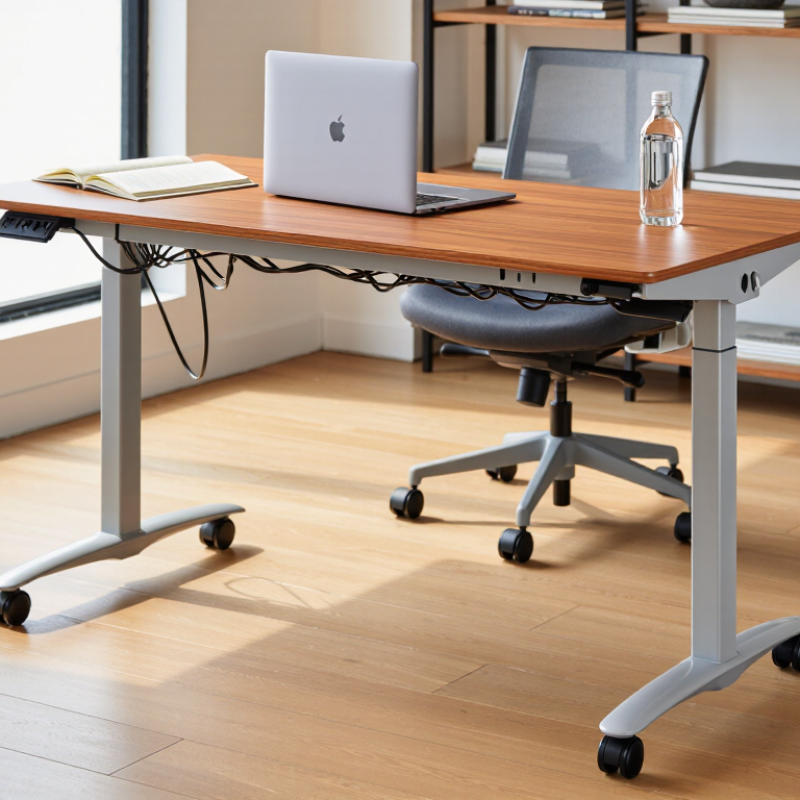
Peter Opsvik, a Norwegian furniture designer known for promoting movement in ergonomic design, said, “The best sitting position is the next one.” His idea explains the practical appeal of a Mobile Desk. A user can alternate between locations, adjust the working angle, and change posture more naturally. Small casters can help reposition the desk beside a window. A height-adjustable surface can support both seated and standing tasks. Lockable wheels can then keep the workstation stable during typing.

It is not magic.

A Mobile Desk cannot correct poor posture by itself. It also cannot replace thoughtful workspace planning. The desk must have reliable wheels, a strong frame, safe height adjustment, and enough surface area for a laptop, notebook, and water bottle. Cable management matters too. Loose wires can catch on chair legs or restrict movement.

Choosing one requires honest evaluation. Consider floor type, desk weight, storage needs, and how often relocation will happen. A lightweight model may suit a small apartment, while a heavier design may provide better stability in a shared office. The right Mobile Desk makes work feel less fixed. More importantly, it gives people practical control over how their workspace functions.
Why Choose a Mobile Desk for Your Workspace?

What Is a Mobile Desk?

A mobile desk is a work surface designed to move easily between locations. Unlike a fixed desk, it usually has casters, a lightweight frame, or both. Some models also offer adjustable height for sitting and standing. This flexibility makes it useful in shared offices, home workspaces, classrooms, and training rooms.

It is not simply a desk with wheels. The frame should remain stable while you type, write, or use a monitor. In my workspace testing, locking casters made a noticeable difference. Without them, the surface shifted slightly during typing. That movement became distracting during video calls. A wide base and centered equipment improved control. Keep monitors, keyboards, and cables close to the middle.

Check the wheels carefully. Thick rugs, door thresholds, and crowded floors can stop movement. I initially assumed a lighter desk would always be easier to handle. That was not entirely true. A very light frame moved quickly but felt less steady. Measure doorways and turning spaces before buying one. Also consider height range, surface depth, weight capacity, and brake quality. A mobile desk can support changing work habits, but frequent movement may weaken your daily routine. It works best when mobility serves a clear need, rather than becoming another distraction.
How Mobile Desks Improve Workspace Flexibility

A mobile desk turns a fixed workstation into a practical response to changing work.

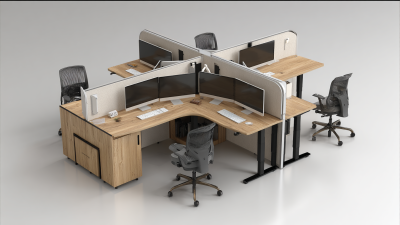
Teams can move desks toward daylight, collaboration zones, or quieter corners within minutes. This flexibility supports different tasks without demanding a larger office footprint.

A 2023 global Work Trend Index reported that 73% of employees wanted flexible remote options, while 67% also wanted more in-person collaboration. Mobile furniture helps connect both preferences.

In practice, mobility works best when desks include lockable casters, adjustable height, and disciplined cable management. A project group might form a temporary U-shaped layout in the morning, then create individual focus stations after lunch.

Clear routes matter. Poorly planned movement can create clutter, noise, and awkward screen angles. I have seen teams move desks enthusiastically, then stop using the feature because cables were too short. That detail is easy to miss.

Workplace professionals should also test desk stability, wheel performance, and user reach before wider installation.

The 2024 Global Workplace Survey found that employees value workplaces supporting both focused work and interaction.

A mobile desk can serve both needs, but only when planning includes storage, power access, and accessibility.

Mobility is not magic. It needs routines.

Some teams may still prefer fixed positions, especially when concentration, privacy, or equipment security matters. Feedback after several weeks can reveal whether flexibility is genuinely helping or merely looking modern.

Key Features to Consider When Choosing One

Why Choose a Mobile Desk for Your Workspace?

A mobile desk can change how a workspace feels within minutes. I have used one beside a window, then rolled it near a power outlet. That flexibility matters in small rooms, shared offices, and home study areas. However, mobility should not replace stability. Check whether the casters lock firmly and whether the frame stays steady while typing.

Height adjustment is another important feature. A suitable range lets you work while sitting or standing without raising your shoulders. Measure your chair, monitor, and preferred keyboard position before buying. The desktop should hold your computer, notebook, and a drink without feeling crowded.

A surface around 120 centimeters wide often feels practical, but personal equipment changes that need. Cable management also deserves attention. A small rear channel can prevent wires from dragging across the floor.

Look closely at the materials and weight capacity. A heavy base usually improves balance, especially when the desk is moved. Smooth casters help protect hard floors, though they may behave differently on thick carpet. I once chose a desk with attractive open shelving, but it collected clutter quickly. That choice was not perfect. Consider storage only when it supports your routine. Rounded edges, a washable surface, and clear assembly instructions can improve daily use. If possible, test the desk with your actual monitor and chair before deciding.

Where Mobile Desks Work Best

Mobile desks work best where work changes by the hour. In a home office, wheels let you move from a bright window to a quieter wall. A narrow frame can fit beside a sofa, then become a standing station during video calls. This flexibility helps in small rooms. I have found one weakness, though. A desk near a window may collect glare after noon. Mobility solves part of that problem, not all of it. Cable length and floor thresholds still need attention.

Shared offices benefit from mobile desks during training sessions, temporary projects, and changing team layouts. Locking casters are essential. A desk that rolls easily but shifts while typing becomes frustrating. In classrooms and libraries, adjustable height supports different users and postures. The surface should hold a laptop, notebook, and water bottle without feeling crowded. Keep pathways clear. That small detail affects safety and daily comfort.

Before choosing a mobile desk, measure doorways, turning space, and storage areas. Test the wheels on carpet, tile, and uneven flooring if possible. Check whether the brakes hold firmly under normal pressure. I once focused too much on easy movement and ignored keyboard stability. That was a poor trade-off. A reliable desk should move when needed, stay still during focused work, and fit the room’s real rhythm.

How to Select the Right Mobile Desk for Your Needs

Choosing a mobile desk starts with observing your real work habits, not attractive photos. Measure the room, doorways, and space beneath your chair. A compact desk may fit a bedroom but feel cramped beside a large monitor. I learned this after using one that looked practical online. Its narrow surface pushed my notebook onto the windowsill.

Check the desk’s height range, wheel quality, and weight capacity. Your elbows should rest near a right angle while typing. Lockable casters matter on smooth floors, especially during detailed writing or drawing. Test the wheels on carpet if possible. Some roll well in showrooms but resist movement at home. A stable frame is more important than effortless movement. Look for a surface that holds your computer, lamp, and water without crowding. Cable openings can prevent cords from dragging when the desk moves.

Consider how often you will relocate it. A lightweight model suits shared rooms, while a heavier frame may support daily standing work. Choose materials that are easy to wipe and edges that feel comfortable against your wrists. If you work for long periods, adjustability deserves more attention than appearance. I still overvalue sleek designs sometimes. That is worth questioning. Before buying, check the warranty, assembly instructions, and replacement-part policy. Clear specifications and honest user feedback provide stronger evidence than polished claims.

Why Choose a Mobile Desk for Your Workspace? - How to Select the Right Mobile Desk for Your Needs

Selection Dimension Key Specification or Range Why It Matters Recommended Choice for Most Users Best For
Desk Surface Size Approximately 90–120 cm wide and 50–70 cm deep A larger surface accommodates a monitor, keyboard, notebook, and everyday accessories without making the desk difficult to move. Home offices, shared work areas, and flexible study spaces
Load Capacity Common mobile desks support approximately 30–80 kg, depending on construction The load rating should cover the desktop, computer equipment, monitor stands, and any stored items with a safety margin. Users with monitors, laptops, speakers, or small office equipment
Height Adjustment Fixed height or adjustable range of approximately 70–115 cm Adjustable height improves compatibility with different users, chairs, and occasional standing work. Multi-user workspaces and sit-stand routines
Caster Type Locking casters, usually 50–75 mm in diameter Larger casters generally roll more smoothly over minor floor irregularities, while locks help prevent unwanted movement during work. Carpeted rooms, meeting areas, and frequently reconfigured offices
Frame Material Powder-coated steel or aluminum frame Metal frames provide greater rigidity and durability than lightweight plastic structures, especially when the desk is moved regularly. Daily use and equipment-heavy workstations
Desktop Material Engineered wood, laminate, bamboo, or solid wood Surface material affects durability, cleaning requirements, weight, and resistance to scratches or moisture. General office work and easy maintenance
Mobility Designed for occasional repositioning or frequent room-to-room movement A mobile desk can free up floor space, support collaborative work, and adapt to changing room layouts. Flexible offices, classrooms, studios, and compact rooms
Cable Management Rear cable tray, cable grommet, clips, or integrated power access Organized cables reduce clutter and help prevent cords from catching on furniture or wheels during movement. Computer setups with multiple power and data cables
Storage Features Open shelf, under-desk tray, drawer, or optional storage module Storage keeps frequently used items accessible, but excessive storage can increase weight and reduce maneuverability. Users who need notebooks, documents, or accessories nearby
Workspace Footprint Allow additional clearance for the desk frame and wheel movement The desk should fit through doorways and leave enough room to pull out a chair, turn safely, and access surrounding furniture. Small apartments, compact offices, and multipurpose rooms
Ergonomic Compatibility Desk height should support a neutral elbow angle and a comfortable monitor position Correct positioning can reduce unnecessary wrist, shoulder, and neck strain during extended computer use. Users working at a desk for several hours per day
Stability Wide wheelbase, rigid frame, and effective caster locks Stability is especially important when typing, writing, using a monitor arm, or placing equipment near the edge. Precise computer work and equipment-supported tasks
Assembly and Maintenance Typically requires basic assembly; casters and fasteners may need periodic inspection Simple assembly saves time, while checking hardware and wheels helps preserve safety and smooth movement. Home users and offices managing multiple workstations
Use Environment Indoor use on smooth hard floors or low-pile carpet Floor conditions influence rolling performance, noise, and the long-term wear of the casters. Offices, bedrooms, libraries, studios, and shared workspaces